Your Ad Here
Showing posts with label Tutorial. Show all posts

June 24, 2012

How to save file from a dead laptop


How to save your file from your dead laptop.

First remove the hard drive by opening the hard drive compartment inside your laptop.
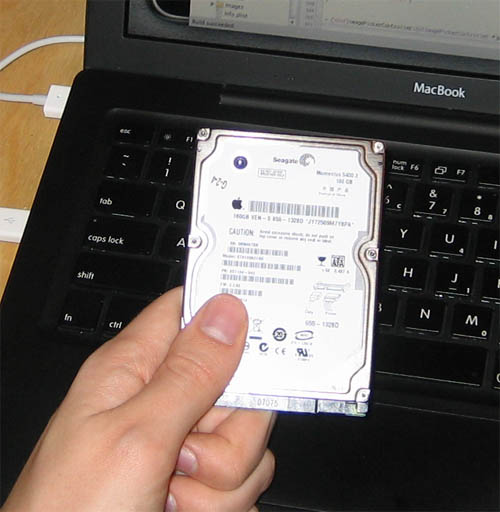
Once your hard drive is removed.

Purchase what we call a enclosure box. The enclosure box will convert the hard drive the was removed from the dead computer and turn it into an external USB hard drive.
the enclosure box should be 2.5" (PATA - if its a very old model) or (SATA - for many newer models).

Difference of PATA and SATA


Here is an example of how a hard drive enclosure box looks like.


After you build your external hard drive , connect it to your new computer and search for your files. They should be there unless your hard drive died too. Good luck!

Laptop with HDMI and no sound

Connected your laptop to your external TV and the sound doesn't go through? Sometimes when you connect your laptop to an external TV using HDMI the video shows up and there is no sound. Many configurations on laptops pass the sound automatically to the HDMI cable. If there is no sound , just make sure the your sound card properties is correctly configured to send the sound through your HDMI cable.

Here is an example of the sound card properties.


Great PHP Tutorial site (Web Development)

Php Acadamy is one of the top tutorial site I have seen on the web for beginners to start learning web development. PHP is programming language that is free and can edit it mostly using any text editor so that there is no need for buying software.

Visit PHP Acadamy HERE and start learning how to do a web site with PHP.


Source: http://www.phpacademy.org/tutorials.php

Top Internet Browser

Top Internet browsers


Most Popular Browsers:
Other Browsers:

Source: Filehippo

Bluefish Editor Web Development IDE


  • Lightweight - Bluefish tries to be lean and clean, as far as possible given it is a GUI editor.
  • Fast - Bluefish starts really quick (even on a netbook) and loads hundreds of files within seconds.
  • A What You See Is What You Need interface
  • Multiple document interface, easily opens 500+ documents (tested >10000 documents simultaneously)
  • Project support, enables you to work efficiently on multiple projects, and automatically restores settings for each project.
  • Multi-threaded support for remote files using gvfs (depending on your gvfs setup, you'll have FTP, SFTP, HTTP, HTTPS, WebDAV, CIFS and more). 1
  • Very powerful search and replace, with support for Perl Compatible regular expressions, sub-pattern replacing, and search and replace in files on disk.
  • Open files recursively based on filename patterns and/or content patterns
  • Snippets sidebar - specify custom dialogs, search and replace patterns or insert patterns and bind them to a shortkut key combination of your liking to speed up your development process
  • Integrate external programs such as make, lint, weblint, xmllint, tidy, javac, or your own program or script to handle advanced text processing or error detection.1
  • Integrate external filters of your liking, pipe your document (or just the current selected text) through sort, sed, awk or any custom script.1
  • Unlimited undo/redo functionality
  • In-line spell checker which is programing language aware (spell check comments and strings, but not code), requires libenchant during compilation.
  • Auto-recovery of changes in modified documents after a crash, kill or shutdown
  • Character map of all unicode characters (requires libgucharmap during compilation)
  • Upload / download synchronisation
  • Full screen editing
  • Many tools such as tabs to spaces, join lines, lines to columns, strip whitespace, etc. etc.
  • Customizable programming language support:
    • In-line reference information (move your mouse over a function name or tag name) for various programming languages
    • Code block folding
    • Highlighting matching block start and end markers (both brackets and tags)
    • Auto-completion and auto-tag-closing for many programming languages, with reference information, and even for nested languages (e.g. css and javascript inside html code that is inside a php document)
    with included language definition files for:
    • Ada
    • ASP .NET and VBS
    • C/C++
    • CSS
    • CFML
    • Clojure
    • D
    • gettext PO
    • Google Go
    • HTML, XHTML and HTML5
    • Java and JSP
    • JavaScript and jQuery
    • Lua
    • Octave/MATLAB
    • MediaWiki
    • NSIS
    • Pascal
    • Perl
    • PHP
    • Python
    • R
    • Ruby
    • Shell
    • Scheme
    • SQL
    • SVG
    • Vala
    • Wordpress
    • XML
  • Multiple encodings support. Bluefish works internally with UTF8, but can save your documents in any desired encoding.
  • Bookmarks functionality
  • HTML toolbar and tearable menu's
    • Dialogs and wizards for many HTML tags, with all their attributes
    • Fully featured image insert dialog
    • Thumbnail creation and automatically linking of the thumbnail with the original image
    • Multi thumbnail generation for easy creation of photo albums or screenshot pages
    • User-customizable toolbar for quick access to often used functions
  • Compliance with the Gnome and KDE user interface guidelines where possible
  • Translations into 17 languages - and more are coming for the next releases .


Download:

http://www.bennewitz.com/bluefish/stable/binaries/win32/Bluefish-2.2.2-setup.exe

Source:

http://bluefish.openoffice.nl

Desktop and Laptop Memory Difference


The desktop hard drive size is 3.5" while the laptop's hard drive is 2.5". On the picture above we can see that the laptop's memory is half size of a desktop memory even thought they are the same speed and type.

June 23, 2012

How to download all images from TUMBLR page

With TumblRipper is one of the best Freeware I have used to download all images from a tumblr page.


TumblRipper
The list of features available on the product page are as follows:
  • Standalone application (no installation needed)
  • Automatically download all photos from a given Tumblr blog.
  • Will try to retrieve the 500px photo, else 400, 300 or the 250.
  • Only photos you don’t already have yet will be downloaded.
  • As light as possible on the Tumblr servers (in fact it will cause less load than a normal visitor).
  • Will keep a small text file in the saved directory with the blog URL to easily update.
  • Keep the original dates from the original upload!
Download:

Source: http://www.zark.be/software/TumblRipper.html